Jupyter Analysis
Python-based analysis workflows using Jupyter notebooks, integrated directly into NOMAD with full provenance tracking.
Overview
Two complementary approaches for notebook-based analysis:
- DtuJupyterAnalysis - Auto-generated notebooks that fetch data from selected NOMAD entries
- DtuJupyterAnalysisTemplate - Reusable templates with complex analysis code that can be applied to different datasets
Both provide provenance tracking from samples through measurements to results.
Basic Jupyter Analysis
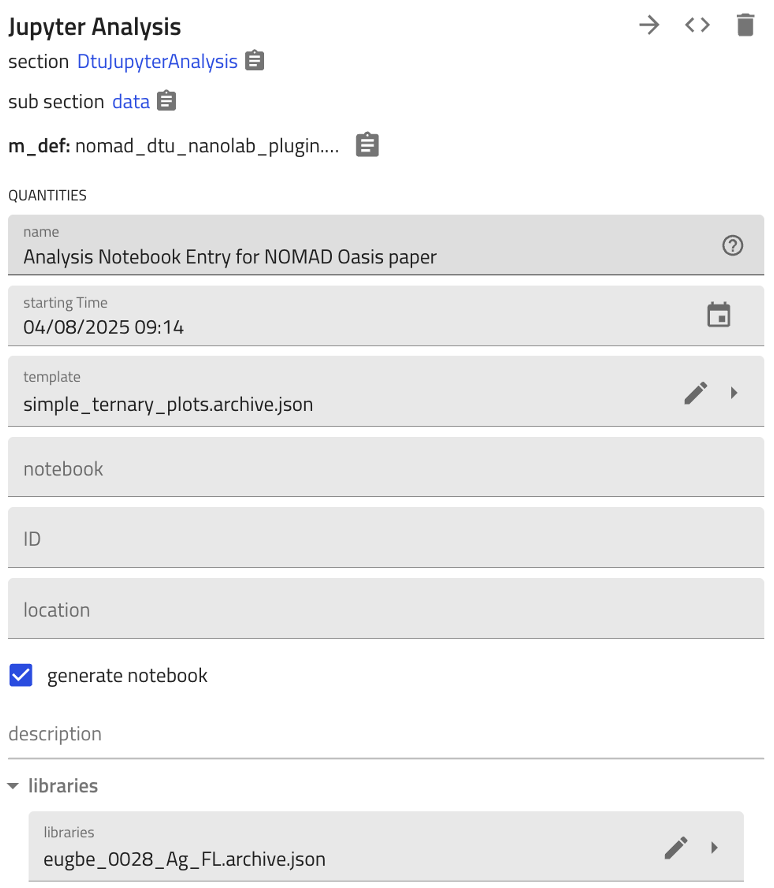
Create analysis entries through an ELN form:
- Select libraries/measurements using the
librariesfield - Check
generate_notebookto auto-create a pre-filled Jupyter notebook - Generated notebook includes API query to fetch selected entries' data
ELN Form Interface
Generated API Query Cell
from nomad.client import ArchiveQuery
from nomad.config import client

analysis_id = 'THE_ANALYSIS_ID'
a_query = ArchiveQuery(
    query={'entry_id:any': [analysis_id]},
    required='*',
    url=client.url,
)
entry_list = a_query.download()
analysis = entry_list[0].data
The analysis_id is automatically replaced with the actual entry ID when the notebook is generated.
Workflow
graph TD
    A[Create Analysis Entry] --> B[Select Libraries]
    B --> C[Enable generate_notebook]
    C --> D[Notebook Generated with API Query]
    D --> E[Add Analysis Code]
    E --> F[Execute & Save Results]

    style D fill:#e1f5e1
    style F fill:#e1f5e1
Templated Jupyter Analysis
Reusable templates for complex analysis code (visualizations, ML models, statistical analysis).
Key Concept
Templates enable reusing sophisticated analysis code with different data sources:
- Template Creation: Convert existing analysis → Replace
analysis_idwith"THE_ANALYSIS_ID"placeholder → Store template - Template Instantiation: Reference template → Select new libraries → Only API query cell is updated → All analysis code preserved
Template Workflow
graph TB
    subgraph "Create Template"
        A1[Analysis with Code] --> A2[Convert to Template]
        A2 --> A3[ID → THE_ANALYSIS_ID]
    end

    subgraph "Use Template"
        B1[New Analysis] --> B2[Reference Template]
        B2 --> B3[Select Libraries]
        B3 --> B4[Query Cell Updated]
        B4 --> B5[Analysis Code Preserved]
    end

    A3 --> B2

    style A3 fill:#ffe1cc
    style B5 fill:#e1f5e1
What Gets Templated
| Component | Template | Instance |
|---|---|---|
| API Query Cell | "THE_ANALYSIS_ID" placeholder |
Actual entry ID |
| Analysis Code | Preserved | Preserved |
| Visualizations | Preserved | Runs on new data |
| ML Models | Preserved | Runs on new data |
Key: Only the data source changes; all analysis logic is reused.
Use Cases
- Complex visualizations (ternary plots, heatmaps) with consistent styling
- ML inference with pre-trained models on new data
- Standardized statistical analysis across sample sets
- Publication-ready figures with uniform formatting
Benefits
- Reproducible: Code and data together in NOMAD
- Provenance: Full traceability from raw data to results
- Reusable: Templates standardize analysis across datasets
- Searchable: Notebooks are searchable NOMAD entries
- Bidirectional linking: Analysis ↔ source data connections
Related Schemas
- Input data: XRD, XPS, EDX, PL, Ellipsometry, Raman, RT
- Analyzed samples: Samples
- Synthesis context: Sputtering, RTP, Thermal Evaporation
Schema Documentation
DtuJupyterAnalysisTemplate
inherits from: nomad.datamodel.metainfo.basesections.v1.Analysis, nomad.datamodel.data.EntryData
properties:
| name | type | |
|---|---|---|
| active | bool |
Controls whether this template is shown as active in the Analysis and Templates app. Set to false to hide it by default. |
| template_notebook | str |
|
| from_analysis | DtuJupyterAnalysis |
|
| generate_notebook | bool |
Generate a Jupyter notebook |
normalization without further documentation
DtuAnalysisStep
inherits from: nomad.datamodel.metainfo.basesections.v1.ActivityStep, nomad.datamodel.metainfo.plot.PlotSection
normalization without further documentation
DtuJupyterAnalysis
inherits from: nomad.datamodel.metainfo.basesections.v1.Analysis, nomad.datamodel.metainfo.plot.PlotSection, nomad.datamodel.data.EntryData
properties:
| name | type | |
|---|---|---|
| template | DtuJupyterAnalysisTemplate |
|
| notebook | str |
|
| generate_notebook | bool |
Generate a Jupyter notebook |
| libraries | nomad_dtu_nanolab_plugin.schema_packages.sample.DTUCombinatorialLibrary |
Libraries used in the analysis. shape= ['*'] |
| steps | DtuAnalysisStep |
An ordered list of all the dependant steps that make up this activity. sub-section, repeats |
normalization without further documentation