Combinatorial Libraries Concept
A key concept in the nomad-dtu-nanolab-plugin is the distinction between physical library pieces and logical sample positions. Understanding this distinction is essential for working with combinatorial materials discovery workflows.
The Core Distinction
Combinatorial Libraries (Physical Objects)
A combinatorial library is a physical substrate with composition gradients or patterns created by multi-target deposition techniques like sputtering. It's an entity—a tangible object you can hold and put on a shelf.
- Physical dimensions: Width, length, thickness
- Lab ID: Unique identifier for inventory tracking
- Creation process: Links to the sputtering or thermal evaporation that made it
- Can be cleaved: Physically cut into smaller pieces for parallel processing
Sample Positions (Measurement Coordinates)
A sample position is a logical coordinate on a combinatorial library representing a specific composition point. Sample positions are also entities (referenceable, persistent), but they are coordinate-based rather than physical pieces.
- Coordinates: (x, y) position on the library
- Composition: Material composition at that location (if gradient exists)
- References parent: Links to the library (intact or cleaved piece) it's located on
- Measurement target: What you actually measure in characterization
Key Insight
Sample positions are defined by coordinates, not by cleaving.
- Cleaving creates physical pieces of the substrate
- Sample positions remain coordinates on the original library
- Multiple sample positions can exist on a single cleaved piece
Visual Understanding
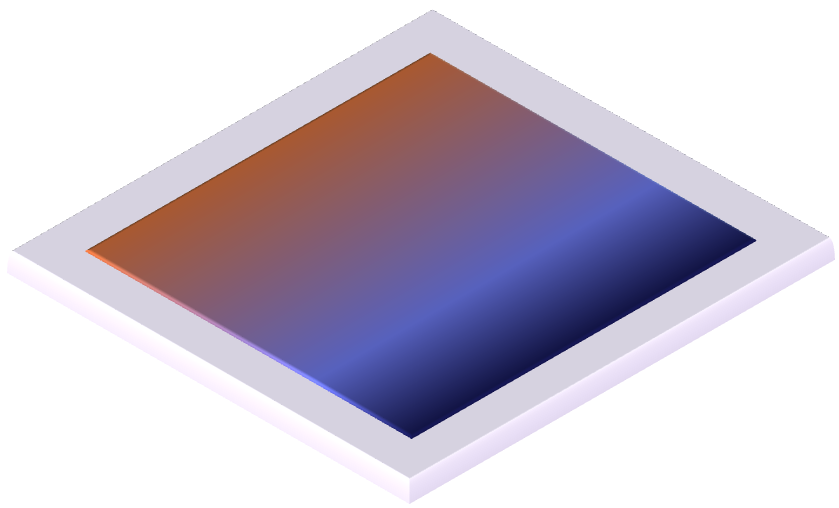
Figure 1: A combinatorial library showing composition gradient across the substrate (e.g., from multi-target sputtering)
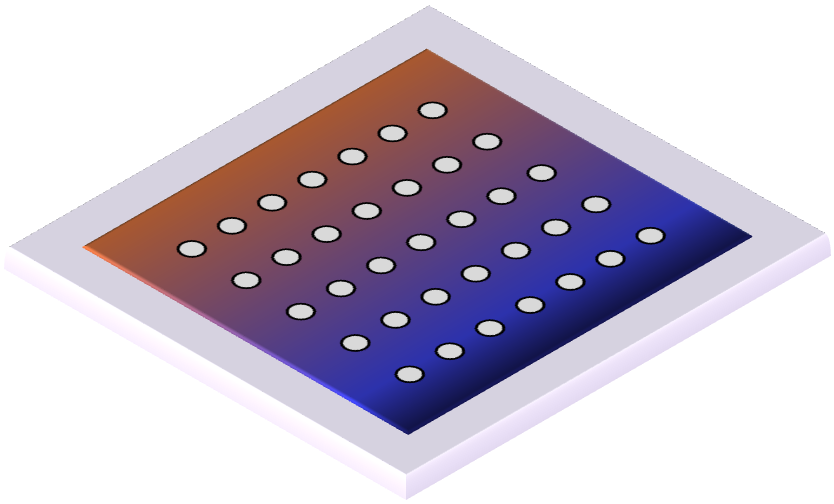
Figure 2: Sample positions (dots) mapped across the library - each represents a specific composition for measurement
Why This Distinction Matters
Composition Gradients Are Spatial
Multi-target sputtering creates continuous composition gradients across the substrate:
- Target A at position 1, Target B at position 2
- Composition varies smoothly across the substrate
- Each (x, y) coordinate has a specific composition
- Position = Composition
Cleaving Is Physical, Not Compositional
When you cleave a library, you're physically dividing the substrate, not redefining compositions:
- Original library: 50mm × 50mm
- Cleaved into 4 pieces: each 25mm × 25mm
- But: Composition gradient coordinate system remains unchanged
- Sample position at (30, 30) is still at (30, 30), whether on intact library or on a cleaved piece
Measurements Reference Libraries, and Track Positions
When you do a mapping measurement on a library, you're measuring at a specific coordinates (composition point).
The Data Model in Practice
Libraries Hierarchy
graph TD
    A[DTUCombinatorialLibrary<br/>Parent Library<br/>Physical: 50×50mm<br/>Composition gradient]
    B[DTUCombinatorialSample<br/>Position 1<br/>Coordinates: 10, 10<br/>Composition: ~80% A]
    C[DTUCombinatorialSample<br/>Position 2<br/>Coordinates: 30, 30<br/>Composition: ~50% A]
    D[DTUCombinatorialSample<br/>Position 3<br/>Coordinates: 40, 40<br/>Composition: ~20% A]
    E[DTULibraryCleaving<br/>Process: Split library]
    F[Child Library Piece 1<br/>Physical: 25×25mm<br/>Contains Positions 1-2]
    G[Child Library Piece 2<br/>Physical: 25×25mm<br/>Contains Position 3]

    A -->|defines positions| B
    A -->|defines positions| C
    A -->|defines positions| D
    A -->|cleaved by| E
    E -->|creates| F
    E -->|creates| G
    B -->|located on| F
    C -->|located on| F
    D -->|located on| G

    style A fill:#e1f5ff
    style B fill:#ccf5cc
    style C fill:#ccf5cc
    style D fill:#ccf5cc
    style E fill:#fff4e1
    style F fill:#e1f5ff
    style G fill:#e1f5ff
Workflow Example
- Create library via sputtering:
- Input: Substrate, Target A, Target B
-
Output: DTUCombinatorialLibrary (50×50mm with gradient)
-
Optional: Cleave library for parallel processing:
- Input: Parent library
- Process: DTULibraryCleaving
- Output: 2 child libraries (physical pieces)
-
Sample positions still reference their (x,y) coordinates
-
Measure at positions:
- XRD measurement
- XPS measurement
- PL measurement
-
Each measurement links to its sample position, which maintains coordinate information
-
Aggregate and analyze:
- Jupyter Analysis collects data by position
- Creates composition-property maps using coordinate information
- Interpolates between measured positions if needed
Composition Mapping Workflow
For libraries with composition gradients:
- Synthesis: Multi-target sputtering creates gradient
- Initial mapping: EDX or XPS at several points to measure composition
- Interpolation: Create composition map model (e.g., linear gradient, gaussian plume)
- Define positions: Place sample positions at compositions of interest
- Optional cleaving: Physically divide if needed for parallel work
- Comprehensive characterization: Multiple techniques at each position
- Property mapping: Correlate composition (from position) with properties (from measurements)
Technical Implementation
In the schema:
- DTUCombinatorialLibrary:
CompositeSystementity with dimensions and synthesis provenance - DTUCombinatorialSample:
CompositeSystementity with: coordinates: (x, y) position on libraryreference_to_library: Links to parent or child librarycomposition: Material composition at this position- DTULibraryCleaving:
Processactivity that: input: Parent libraryoutputs: Multiple child libraries (physical pieces)- Sample positions maintain their coordinate references
Learn More
- Data Model Philosophy: Understanding entities vs. activities
- Materials Discovery Workflow: See how libraries fit into the complete workflow
- Reference: Samples: Technical schema documentation for libraries and positions
- Reference: Library Cleaving: Technical schema documentation for cleaving process
- Tutorial: Hands-on practice with combinatorial libraries